
Views: 223
To install new Teams on a single computer with many users, follow these steps:
- Download the .exe installer. If you have downloaded this file previously confirm you have the latest version by comparing the properties on each file.
- Open the Command Prompt as an Admin.
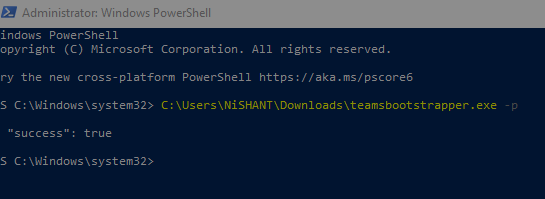
- At the prompt enter: .\teamsbootstrapper.exe -p
- A success or fail status displays. If you receive an error, learn more at
| Name | Description | Value |
|---|---|---|
| S_OK | Operation successful | 0x00000000 |
| E_ABORT | Operation aborted | 0x80004004 |
| E_ACCESSDENIED | General access denied error | 0x80070005 |
| E_FAIL | Unspecified failure | 0x80004005 |
| E_HANDLE | Handle that is not valid | 0x80070006 |
| E_INVALIDARG | One or more arguments are not valid | 0x80070057 |
| E_NOINTERFACE | No such interface supported | 0x80004002 |
| E_NOTIMPL | Not implemented | 0x80004001 |
| E_OUTOFMEMORY | Failed to allocate necessary memory | 0x8007000E |
| E_POINTER | Pointer that is not valid | 0x80004003 |
| E_UNEXPECTED | Unexpected failure | 0x8000FFFF |


Thank for sharing steps…