
How to Disable Unlock Premium in Microsoft Teams
Steps to Disable Unlock Teams Premium TrialMicrosoft Teams sometimes displays an Unlock Premium button that allows users to start a Microsoft Teams Premium trial. For many organizations this creates confusion because users may activate trials without IT approval.
In this guide you will learn how to disable the Unlock Premium option using the Microsoft 365 Admin Center so users cannot activate the trial themselves.
Steps to Disable Unlock Teams Premium Trial
Table of Contents
What is Microsoft Teams Premium?
Microsoft Teams Premium is an advanced add-on for Microsoft Teams that provides enhanced meeting and collaboration features.
- AI powered meeting recap
- Intelligent meeting summaries
- Live translated captions
- Advanced webinars
- Meeting branding
- Enhanced meeting protection
Why the Unlock Premium Button Appears
The Unlock Premium button appears when self-service trials or purchases are enabled in Microsoft 365.
- Users can start a Teams Premium trial
- Premium features become available temporarily
- License management becomes difficult
How to Disable Unlock Premium
To prevent users from activating Teams Premium, administrators must disable the self-service trial option in the Microsoft 365 Admin Center.
Step-by-Step Guide
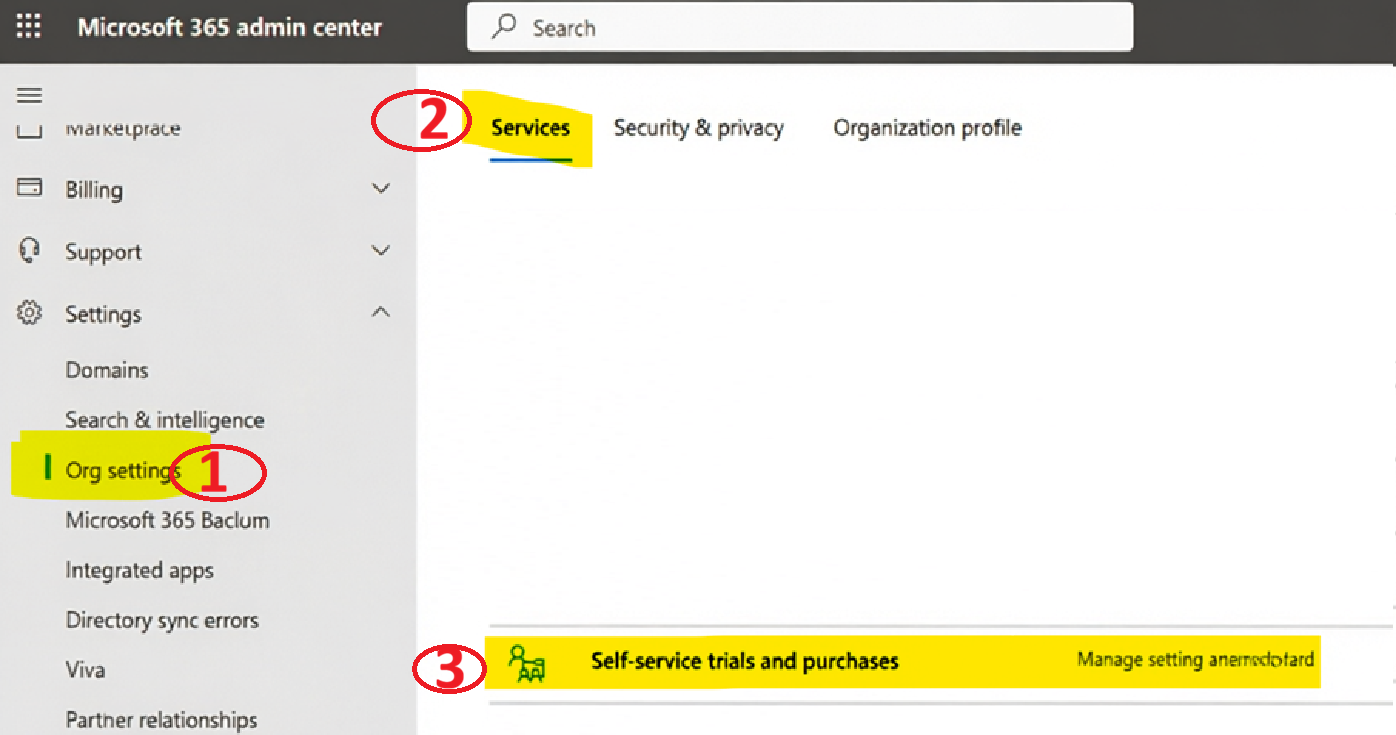
Step 1: Open Microsoft 365 Admin Center
Go to:
Sign in using a Global Admin or Billing Admin account.
Step 2: Open Organization Settings
- Click Settings
- Select Org Settings
Step 3: Open Self-Service Trials
- Click Self-service trials and purchases
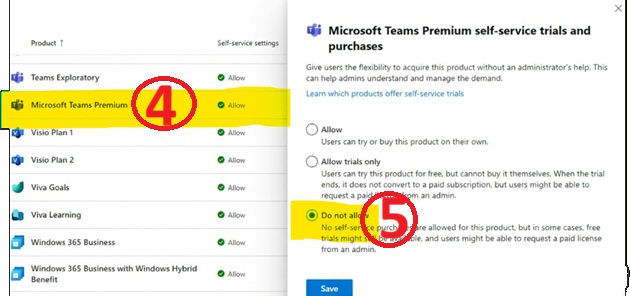
- Find Microsoft Teams Premium
Step 4: Disable Teams Premium Trial
- Select Do Not Allow
- Click Save
What Happens After Disabling?
- Users cannot activate the Teams Premium trial
- Admins maintain full licensing control
- The button will not start the trial
Note: Microsoft currently does not allow removing the Unlock Premium button completely.
Best Practices for Administrators
- Disable self-service purchases
- Assign licenses only through IT
- Monitor Microsoft 365 licenses
- Educate employees about Teams features
Frequently Asked Questions
What is the Unlock Premium button in Microsoft Teams?
The Unlock Premium button allows users to start a free trial of Microsoft Teams Premium.
Can administrators remove the Unlock Premium button?
No. Administrators cannot remove the button but they can disable the Teams Premium trial.
How long is the Microsoft Teams Premium trial?
The trial usually lasts around 60 days depending on Microsoft policies.
Can users activate Teams Premium without admin approval?
If self-service trials are enabled, users may activate the trial themselves.


Hello there, You’ve done a great job. I will definitely digg it and personally suggest to my friends.
I’m sure they will be benefited from this website.
Hi there everyone, it’s my first go to see at this site, and
paragraph is truly fruitful in favor of me, keep up posting such posts.
Valuable information. Fortunate me I found your web site
by chance, and I am stunned why this twist of fate did not happened in advance!
I bookmarked it.
Great work! I really helpful this. I’ll be bookmarking it and sharing it with my colleagues. They’ll definitely find it useful too.